
I like versatile products like Nita Hair.
Nita Hair for Genesis 3 Female is also compatile with Genesis 8 Female and more than that, you can get until 5 hair styles with just this hair.
For instance, I'm using Nita Hair on Genesis 8 Female. This character is Yumi from my set Japanese Face & Body Shapes for Genesis 3 and 8 Female with Kassandra HD's textures.

Now you'll see how to create more styles with this hair. All the magic will happen in the Surfaces Tab. Select Nita Hair and go to Surfaces Tab and select the B_Hair surface then search for Cutout Opacity parameter and turn the dial down to zero.
Now you have a new Long Hair without the bangs.
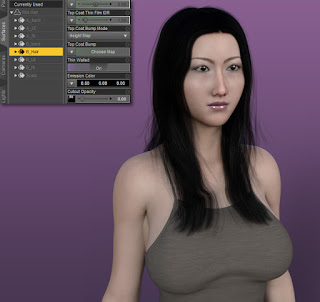
You can continue selecting the A_RI and B_RI surfaces and turn the Cutout Opacity to zero, too. Now you have a Half Shaved Hairstyle.

And if you select the left side, A_LE and B_LE, turning the Cutout Opacity down to zero, we have a Slick Hairstyle.

Turning the back surfaces (A_back and B_back) down, we have a Very Short Hairstyle.

You can even turn the Cutout Opacity to 50% getting a shaved hair style.

I recommend you to search your hair library and figure out what you can do with the hairs you own.
Nita Hair for Genesis 3 Female is also compatile with Genesis 8 Female and more than that, you can get until 5 hair styles with just this hair.
For instance, I'm using Nita Hair on Genesis 8 Female. This character is Yumi from my set Japanese Face & Body Shapes for Genesis 3 and 8 Female with Kassandra HD's textures.

Now you have a new Long Hair without the bangs.

You can continue selecting the A_RI and B_RI surfaces and turn the Cutout Opacity to zero, too. Now you have a Half Shaved Hairstyle.

And if you select the left side, A_LE and B_LE, turning the Cutout Opacity down to zero, we have a Slick Hairstyle.

Turning the back surfaces (A_back and B_back) down, we have a Very Short Hairstyle.

You can even turn the Cutout Opacity to 50% getting a shaved hair style.

I recommend you to search your hair library and figure out what you can do with the hairs you own.
Comments
Post a Comment