
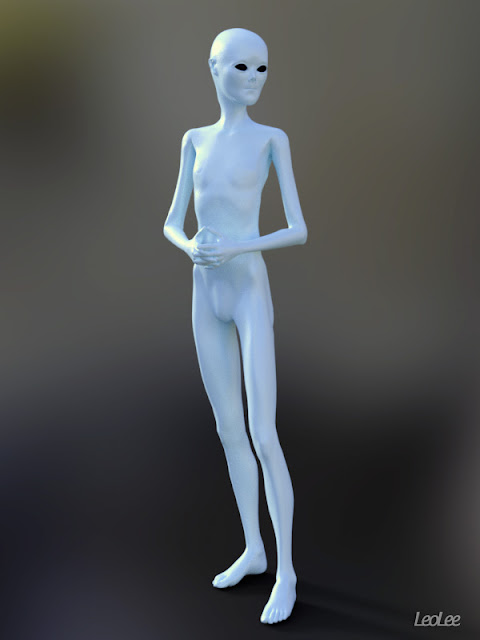
Hello, People! I made this free alien morph for Victoria 4 as a gift to all you.
I made this morph only with the Victoria 4.2 Morphs++ dials. There are no custom morphs.
All you need is the Victoria 4.2 Base and Victoria 4.2 Morphs++ available at DAZ3D.
There are no textures at all. Only basic shaders I set for the skin and the eyes.
For those who are not familiar with it, this character is for use in Poser and Daz Studio.
It comes with Head and Body Injections and removes in .pz2 format.
You can find the MAT file in the Poser's Material Library for the Alien look.
Look at the ReadMe file for more info.


Download for Poser and Daz Studio
I made this morph only with the Victoria 4.2 Morphs++ dials. There are no custom morphs.
All you need is the Victoria 4.2 Base and Victoria 4.2 Morphs++ available at DAZ3D.
There are no textures at all. Only basic shaders I set for the skin and the eyes.
For those who are not familiar with it, this character is for use in Poser and Daz Studio.
For Poser
It comes with Head and Body Injections and removes in .pz2 format.
You can find the MAT file in the Poser's Material Library for the Alien look.
Look at the ReadMe file for more info.

For Daz Studio

The Head and Body INJ and REM go into the Poser Formats directory (Runtime folder). The same directory you have installed the Victoria 4 files if you use the DIM (Daz Installer Manager).
The materials files go into your Daz Studio Library because they are .duf files. There is one material for 3Delight render and other for Iray render.
You can find them in the folder People > Victoria 4 > Materials > V4 Alien.
Again, look at the ReadMe file for more info.

This Alien is a basic morph for V4, I did not make any custom morphs, so you can make your own custom morphs and create your own textures as you like.
You can make a lot of other variations with just the dials. So have fun!
This is my Sci-Fi Christmas gift for you. Any doubts or suggestions, comment!
And don't forget to subscribe for new stuff!
Merry Christmas!!!
PS: I'd like to see your creations with this base alien (new morphs, textures, artworks, etc). So send me the links. 😊
Comments
Post a Comment